What’s new in Document Locator
v26 Arriving Early 2026
Early access available now in Release Candidate (RCv25)
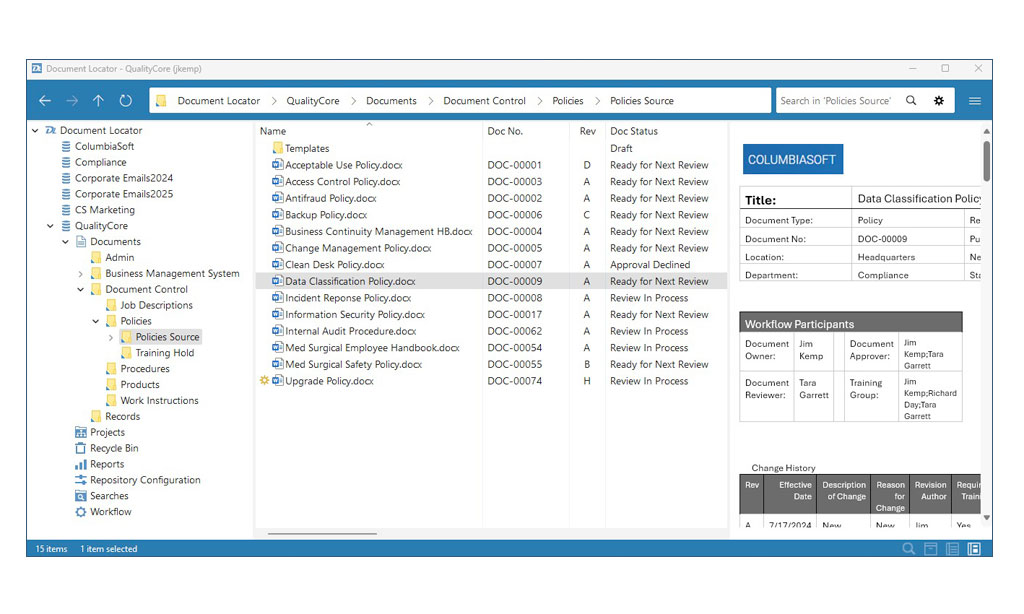
All New Document Locator Desktop
Introducing the New Document Locator Desktop, built to evolve with Windows while remaining independent.
WebTools Updates
WebTools and WebTools Desktop now include modern dialogs for creating, importing, checking in documents, updating profiles, and a new Group Manager configuration.
Watch a video
New Document Locator Desktop
The New Document Locator Desktop is a standalone application that delivers the same familiar folder and file usability in a faster, more reliable system. By eliminating deep Windows system hooks, it runs smoothly through every Windows update with fewer conflicts and a more responsive interface. It’s designed for speed, reliability, and uninterrupted productivity, allowing you to focus on your work, not your system.
- Familiar Structure, Improved Package
Same intuitive folder and file design in a modern, streamlined application. - Continuity with Performance
Faster performance, smoother navigation, and fewer slowdowns. - Stable and Dependable
Resilient through Windows updates in preparation for future editions of
Windows. - Easier to Use, Easier to Support
A reliable experience so your work stays uninterrupted.
Additional Updates
Updates in WebTools
- All new modern Dialogs for New Document, Import, Check-in, and Update Profile are added to WebTools and WebTools Desktop.
- Group Manager configuration is added to WebTools and WebTools Desktop.
Support for Microsoft OAuth SMTP
Workflow and notification emails are sent securely through Office 365 without storing passwords, in compliance with modern authentication requirements.
Enhanced Logging
New logging is added for user actions, including login and navigate.
Entra ID
Active Directory Replication Console now includes support for Entra ID (formerly Azure AD), supporting both on premise and cloud Active Directory.
Additional Updates In New Desktop
- Search from file open dialogue.
- Drag files onto files for immediate versioning.
- Improved CoPilot support with OneDrive local path working folder.
- Drag and drop from New Outlook.
Prior versions
Ready for a Demo?
Take the first step towards streamlining your processes and enhancing collaboration with Document Locator. Request a demo today and discover how our document control solution can help your organization.
Fill out the form to get started.